How to turn a GraphQL API into a conversational interface
I’m fascinated by agents (as many are these days) and am particularly excited about building agent architectures that work deliberately to minimise hallucinations.
Models have become incredibly capable but they are still the most stochastic component in our architecture. For this reason we need to assume hallucinations can happen and that unexpected “decisions” can be taken by the agent.
When working with agents that enable conversational interfaces to extract information from a system we need to design how to minimise opportunities for inaccurate results.
For this reason, I set out to build a reference architecture for a “simple” scenario: a conversational interface to query real data that is constrained enough to always return actual validated responses and that minimises opportunity for hallucination.
This is the first in a three-part series of articles about this architecture. We will start with the basic project and we will see a working chat interface in part one already. We will also highlight what’s brittle in the first iteration and what could be improved to constrain the result further so that it doesn’t risk emitting false information.
Let’s dig in.
Overview
Since I work at Beeline, I picked a domain I am familiar with. For the purpose of this exercise we are going to have a service that owns worker information (like name, date of birth, email, country of residence) and corresponding work information (like title, org name, start date, end date, daily rate, currency, business location). The service exposes a GraphQL API.
GraphQL is quite an expressive language but it still requires knowledge of its schema, understanding of the exposed filtering syntax, whether pagination is available, aggregations and so on.
For the implementation, we are going to have the workers service responsible for exposing the GraphQL API (and its PostgreSQL backing store) and the agent service responsible for the natural language interaction.
The challenge is therefore: how can we make natural language be the interface that translates intent into the correct GraphQL query?
Let’s look into the Agent Service, responsible for doing that.
The Agent Architecture
For the purpose of this exercise I picked LangGraph because I was familiar with it. It gives you a nice and descriptive API to describe your agent graph.
For the first iteration, we are assuming a single-prompt conversation (as opposed to a multi-turn one).
The idea is quite simple: give the LLM the GraphQL schema and a natural language prompt and have it guess the query that makes the most sense for that intent.
We can do that because the schema in question is relatively small. It’s common for GraphQL schemas to be so vast that they cannot simply be included in the system prompt. For those scenarios we will need to look into schema discovery techniques the agent can use incrementally.
For the purpose of this exercise, the LLM will use the natural language prompt and the schema to produce a sensible GraphQL query and variables. The agent, will coordinate the flow, finally taking the output query and feeding it into the GraphQL API service.
The implementation of the above chart in LangGraph looks something like the following:
graph = StateGraph(AgentState)

# first define the chart nodes
graph.add_node("plan", plan_query)
graph.add_node("execute", execute_query)
graph.add_node("answer", answer_from_result)

# then the edges
graph.set_entry_point("plan")
graph.add_edge("plan", "execute")
graph.add_edge("execute", "answer")
graph.add_edge("answer", END)
Plan
In the plan step we are going to prompt the LLM to produce the best GraphQL query it can that matches the intent and works with the given GraphQL SDL.
Our system prompt will look roughly like this:
f"""
Translate the user's question into a query for this read-only worker/engagement GraphQL API.
You will be given a question. Emit a single JSON object:
{{"query": "<GraphQL document text>", "variables": {{...}}, "rationale": "<one sentence>"}}
Produce the best query you can for the requested information. Emit ONLY the JSON
object, with no prose or markdown fences.
SDL:
{SDL}
"""
As you can see we are also asking the model to include a rationale field with a one-sentence description of why it picked the fields it picked.
This way, we can try and better identify gaps in our system when the agent doesn’t perform as expected.
Execute
The Execute node is entirely deterministic. It takes the incoming GraphQL query as produced by the Plan node and runs it against the Worker service.
For this initial iteration, the graph won’t be resilient to failures in the execute node. Any error returned by the GraphQL API will be reported back to the user and the agent will stop. In future iterations, this node can be enhanced with auto-repair attempts and other techniques that minimise failure.
After the execution, the returned GraphQL response is handled by the Answer node that is responsible for turning it into a conversational one.
Answer
We’ll use the Answer node to synthesize a response for the end user. The context we care to share with the LLM for this step includes:
- the original user request
- the exectued GraphQL request
- the result GraphQL response.
In this node we won’t be providing the whole GraphQL schema to the model because it would unnecessarily dilute the context needed to produce a response synthesis.
Our prompt will look something like:
"""You answer a question using ONLY the JSON result provided. You were
not shown the schema, the conversation history, or how the query was built — only the
question, the query that ran, and its result.

Rules:
- State only facts that appear in the result JSON.
- If the result is empty or null, say plainly that nothing matched — do not guess why.
- Be concise and direct. No hedging filler, no repeating the question back at length.
- If the result contains more than ~15 individual records, do NOT enumerate every
  one in a table, and do NOT group, count, or tally them yourself — that is
  arithmetic the database wasn't asked to do, so any breakdown you compute here
  cannot be trusted. State the total count exactly as it appears in
  pageInfo.totalCount, list a handful of representative records as examples, and
  say there are more.
"""
As you can see we included a few rule statements to minimise the opportunity for the model to produce unhelpful text, like filler words, or summarize important details away.
We will then use the above as the system prompt and provide the specific details of this turn as the user content (original request, GraphQL request, response).
The Agent in Action
Let’s see what we get for the current architecture. For the user interface, we are going to use Chainlit. The agent component will expose the chat interface that will delegate the incoming requests to the current agent graph.
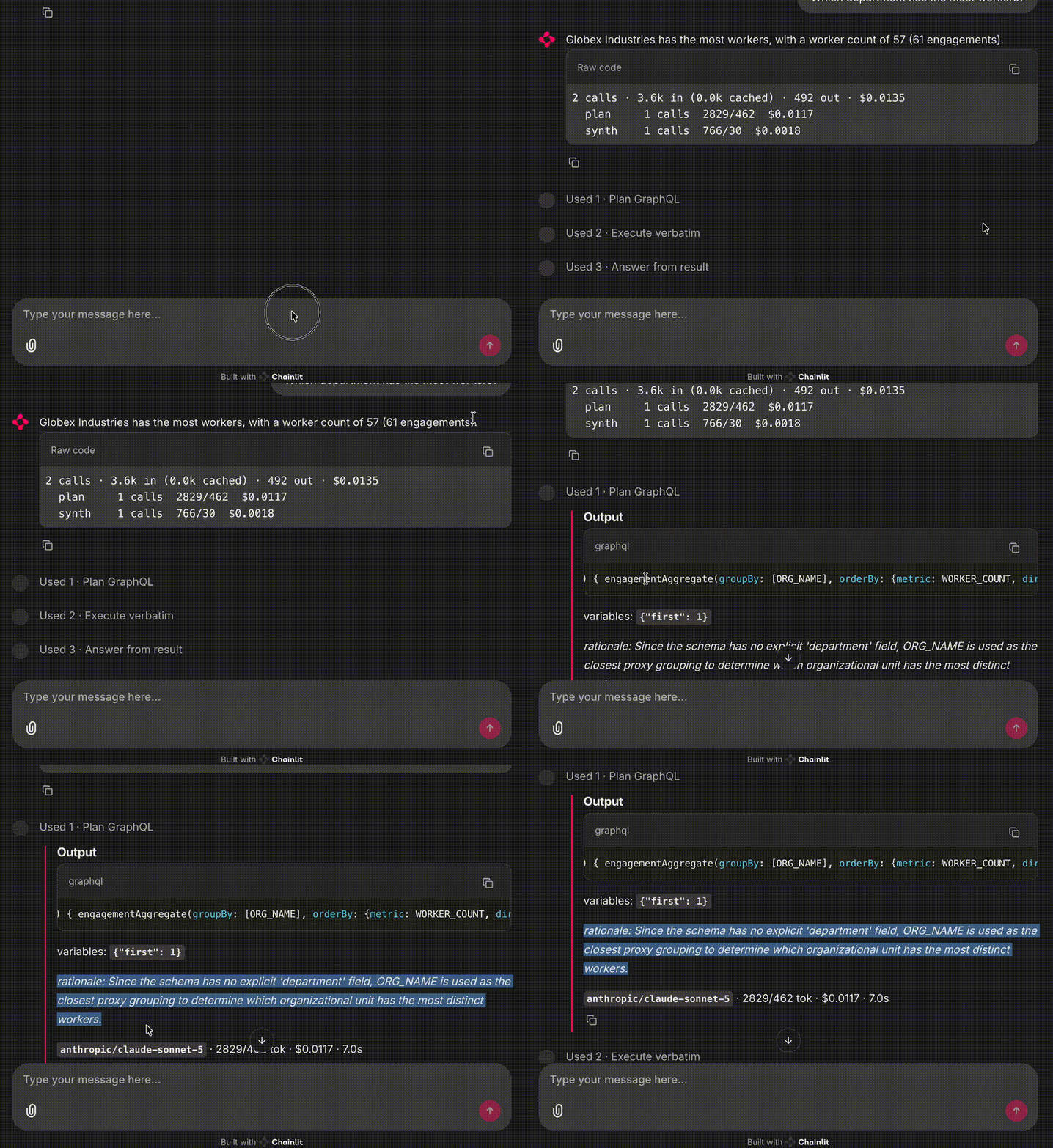
We asked:
Which department has the most workers?
In this run the agent answered:
Globex Industries has the most workers, with a worker count of 57 (61 engagements).
That’s pretty good. The whole flow worked straight away!
But if we pay attention to the details we notice that the agent silently changed something: it picked ORG_NAME as the field for our department request. Rationale:
Since the schema has no explicit ‘department’ field, ORG_NAME is used as the closest proxy grouping to determine which organizational unit has the most distinct workers.
The model produced a persuasive justification for picking ORG_NAME in place of “department” and then confidently answered “57 workers” to our question. The assumption that department and organization can be swapped means that we cannot really trust the answer addresses our original intent.
In this case, providing the full SDL as part of the plan prompt sufficiently constrained the agent to not make up fields. On the other hand, it led the agent to forcefully swap a semantically close enough field for what we asked for (organization name vs department).
Conclusion and improvement opportunities
The current architecture gets us an answer but it doesn’t prevent the agent from providing false or inaccurate information, confidently, in response to our query.
We saw how including the rationale field in the output helped us catch that ORG_NAME was being used as a substitute for ‘department’.
When working with agents that handle such critical information, it’s important to design a user interface that makes it really easy to the end user to inspect the process the agent went through to produce the final answer.
In this first iteration, rationale is only a debugging field that is not exposed to the Answer node. An immediate next step could be to feed that rationale to the Answer node so that the final natural language answer can be explicit about the caveats behind the returned response.
We saw how getting something up and running is easy but the real challenge is in the details. How do we minimise false statements? How do we ensure the conversation is grounded in real data? How can we make sure the agent sticks to what the data layer exposes and how to handle errors and retries? And finally, how do we minimise semantic substitutions like the one that just happened?
We will look into how to iterate on top of this architecture in the next part of this series.
If you enjoyed this article, follow me on X or LinkedIn where I share my journey and my articles. Stay tuned for the next part.